One year has passed, new core features and sharing
Following the learn-by-doing approach, in September 2024 I started working on my first app, Drinklytics. In these articles I share my journey, ideally once a month
Welcome to a new update on my Build in Public journey with the Drinklytics app.
I realize just now that September marked the anniversary of the start of the project; not the publication, but the very first experiments.
I had the opportunity to look back a little, and I think I learned some important things:
- Better time and priority management (I.C.E. framework and time-blocking). In a side project they are not a given.
- Substantial improvement in my prompts structure (brainstorming and refining in out-of-context chat)
- I deepened my understanding of ASO concepts through hands-on experience
- I overcame of my shyness and reluctance to write publicly and step outside my comfort zone
✅ Done
The “Custom importer” is live! It’s based on a user’s feedback, who asked me to create a way to import an existing archive, previously created in excel or using another app.
I found the idea very challenging and useful. It required me almost a month and a half of testing and testing to try to release a (beta) feature, as stable as possible. Now a user can import XLSX, CSV or JSON files.
For any field missing in Drinklytics, a user can create a custom one on the fly, and if the user’s file doesn’t contain a mandatory field, he can choose to fill the field with custom values.
I tested this features with fake files thousands rows long, and it worked. In the previous update I also referred to some technical aspects I had to face.
Another user on Reddit found that the pics taken within the app weren’t available outside of it.
This is the standard behaviour of Drinklytics, but I saw the point of the user, so I added three ways to solve this problem:
- a general setting that let the app to save a copy of a pic into the gallery of the device (disabled by default, full size pic)
- a download button that appear when a user open a drink image inside the app (optimized size pic)
- a share button that appear when a user open a drink image inside the app (optimized size pic)
This is also another way to make people free to use their data outside the app, to avoid lock-in.
Last but not least, I added a “What’s new” screen. No one asked for it, but I think is a way to make users aware of the new value offered by the app.
On my device, updates are automatic and they run in background so, every now and then, I discover by chance new features inside the apps I use.
If an app doesn’t show me the changelog, I can’t know what’s new.
This is the reason why behind this new feature. Is enabled by default, but users can easily disable it.
🚧 Progress
I am working on a core feature, a personal stats screen, a kind of a hub to get an overview of the user’s tasting journey. This new screen should become a pillar of the Drinklytics experience.
It’s not always possible or desirable to contribute financially to a project, and Drinklytics was created free of charge and will remain so.
For this reason, I am also trying to allow users to contribute to the project in other ways, specifically by encouraging them to share it with people who might be interested, thereby increasing the audience of potential users and, indirectly, the number of donations.
That’s why I am working on some sharing features to experiment some growth techniques.
📈 Numbers and goals
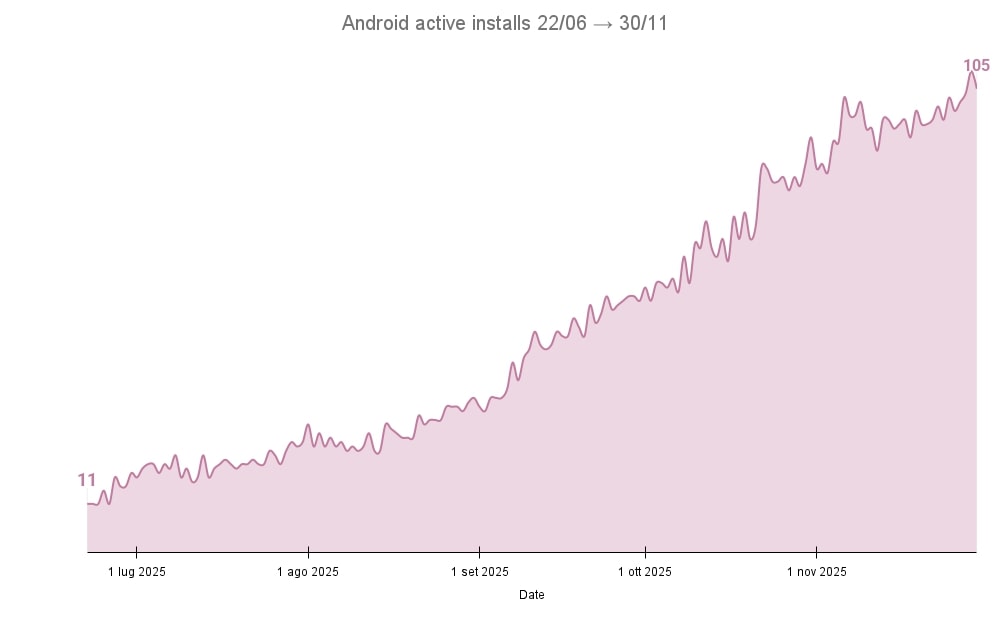
As usual, some number to show the growth of Drinklytics.
Here the active installs, they are increasing slooower, but still 100% organic.
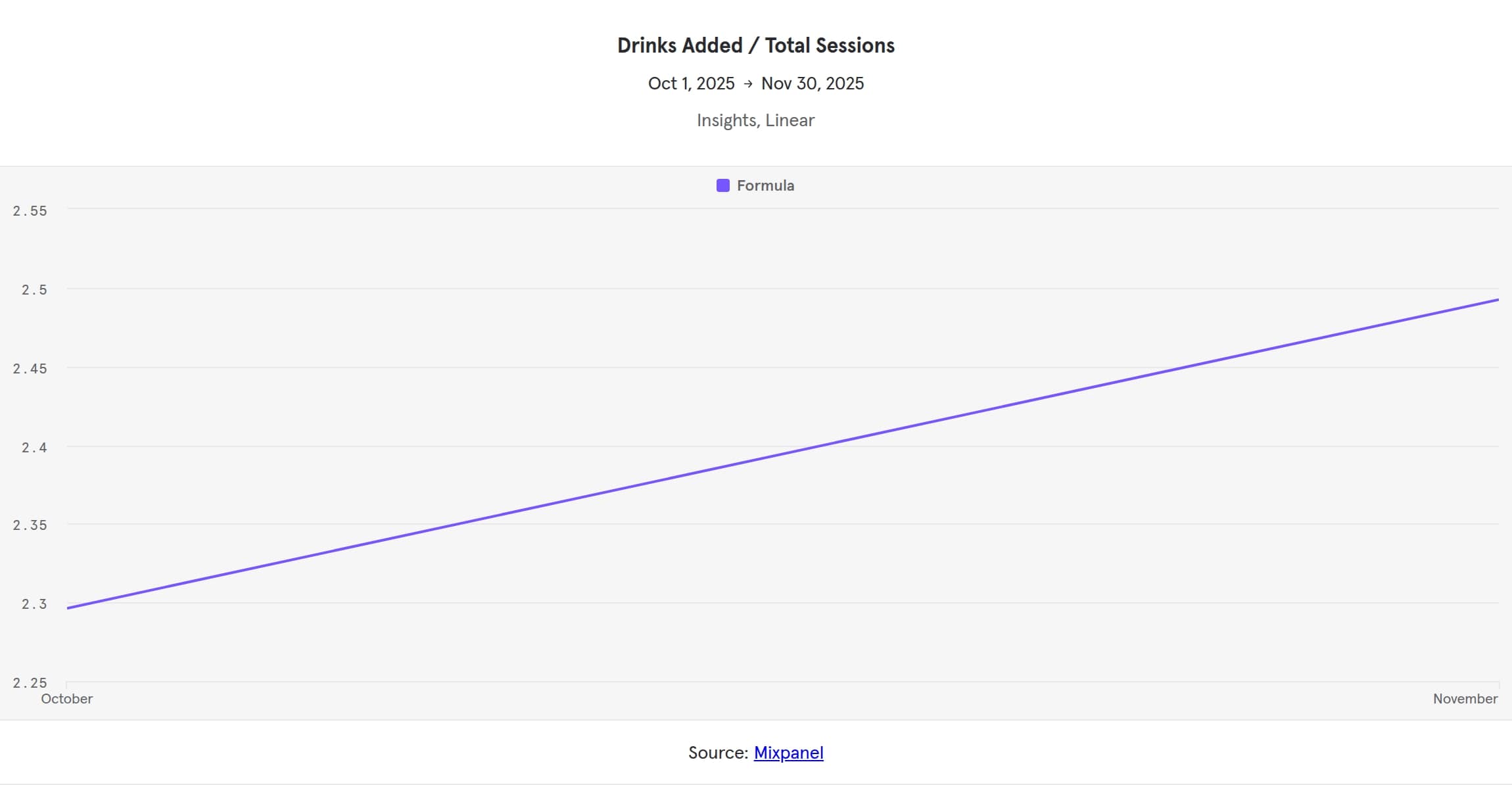
And here some Mixpanel numbers, from the people who enabled the stats tracking (pure love for them ❤️).
Total drinks added

And the drinks added ratio
Drinklytics, personal, offline, tasting notes app
Whether you are a lover or an explorer, create your own personal archive of drinking experiences.


Drinklytics is an Android app for remembering one's drinking. Whether it's beer, wine or hard liquor, with drinklytics you memorize every drink.

Data marketer, product management, python and agile methodologies. This space is my single source of truth.
Here I share #thoughts and #buildinpublic, waiting for the A.I. to conquer the world.
Personal opinions and considerations.